
Several times already since February when the new version of Remember The Milk came out, I’ve considered moving my “Work” to do list into it, merging it with all of my personal tasks. I’ve loved Remember The Milk for a long time even when it’s design was questionable and there was no native (or “native”) app. But when RTM made a huge update to all their apps, they definitively reasserted their competitiveness in the field of To Do List Apps (despite the fact that they’re an 11 person organization and three of their employees share a last name with the two co-founders and one of the 11 people is a stuffed monkey).
Much like Rands (aka Michael Lopp), I try out productivity solutions whenever I hear of a new one. The main reason I’ve been so hesitant to move my Work Stuff into Remember The Milk is because I feel like I need the separation there. On the evenings or weekends, or even when I just want to see if there’s any personal stuff I can knock out, I don’t want to have to see all the work stuff that I need to do. I still think about it… Especially as we approach the start of a new year and I think about all the ways I can procrastinate by pretending I’m becoming more efficient continue my journey of self improvement. But in the mean time, here’s why I think that the new Remember The Milk is the solution.
(Note that this post is not intended to convince anyone to start pursuing a path toward a productivity system, or dictate how such a system should work. It pretty much assumes that you already use one or more apps or that you have some sort of productivity system already in place. It’s also not a step-by-step how-to because you can get that other places and it would take me forever to repeat what others have done better. This is mostly just to promote Remember The Milk because I use it and love it.)
It Feels Solid, Yet Easy To Use
I know this is very difficult to quantify and/or qualify objectively, but it’s also the most important thing for me when I am essentially unloading my mind into “the cloud.” I want an app that feel like scaffolding on which I can build a skyscraper of productivity. Or, since it’s that time of year, a tree on which I can hang bright lights and shiny ornaments and have people marvel at how I have it up right after Thanksgiving. I don’t want something that feels like scaffolding on a rainy or icy day. Oh, sorry… continuing the wrong metaphor. I don’t want an app that feels like a stocking full of little trinkets where I have to unpack the whole thing to find what I’m looking for.
With Remember The Milk, I don’t get the feeling that I’m going to lose or misplace something (in the digital realm at least). Remember The Milk isn’t the only app I’ve tried that feels solid and secure. Most of those that give me that feeling, though, also feel cumbersome, like there’s a trade-off between feeling like To Do items won’t get lost in a red velvet sock filled with them and the ability to quickly add new items.
Remember The Milk makes entering new tasks easy, fluid, almost frictionless, whether you use the short cuts available on the web site or “native” app (# for lists or tags, ! for priority, @ for location, ^ for due date, * for repeating tasks, = for time estimates) or whether you are entering tasks via the mobile app. Look at this layout:
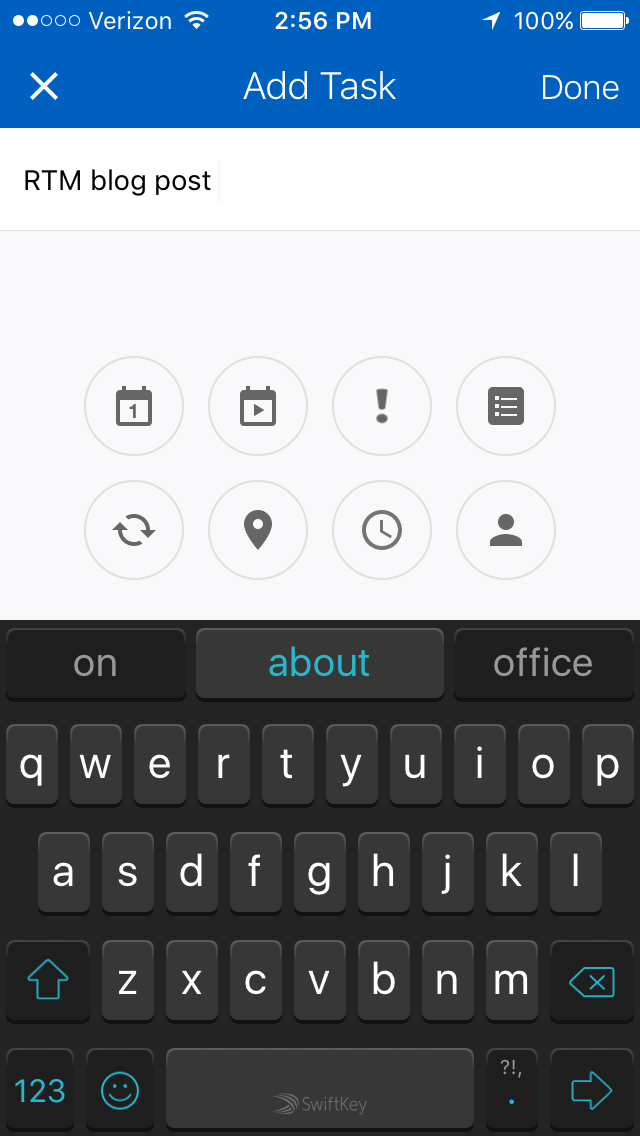
Everything is there – you can add every piece of metadata with two taps. Adding due dates at a specific time takes a couple extra taps, and sometimes adding tags requires typing in the first couple of letters, but even when you want to do that, the interface provides enough room that you don’t struggle with it.
The app I use for Work To Dos (which shall rename nameless), has actually gone backwards in terms of the interface for entering tasks; a big reason I’ve considered moving them over into RTM. Some parts are clean and efficient, some parts feel cluttered and confusing or make me feel like I’m using the app wrong.
You Can Postpone Tasks Quickly
Getting Things Done purists will argue that having a due date for most of your tasks goes against the natural decision making process that GTD encourages by discouraging due dates entirely. However, finding a system that works has to be a matter of personal preference: A system that doesn’t fit the exact model prescribed by any productivity guru but that you’ll actually use is always better than a system that conforms to specific rules which falls by the wayside before you even hit a rough patch.
With that preface out of the way: I use due dates. Mostly because Remember The Milk (like every other app I’ve tried) makes it easiest to view a list of tasks that are due Today. When you open them up, they default to the Today view, so I use a due date of Today as more of a “Next Action” tag than an actual hard and fast due date. (There David Allen, you happy?)
The only problem with using a due date of Today as a Next Action tag is the next day when the app thinks that a tasks is Overdue. Most apps make assigning a new Due Date pretty easy (which makes sense since they force the Today list on you), but Remember The Milk does it as good as the best and better than most. Witness:
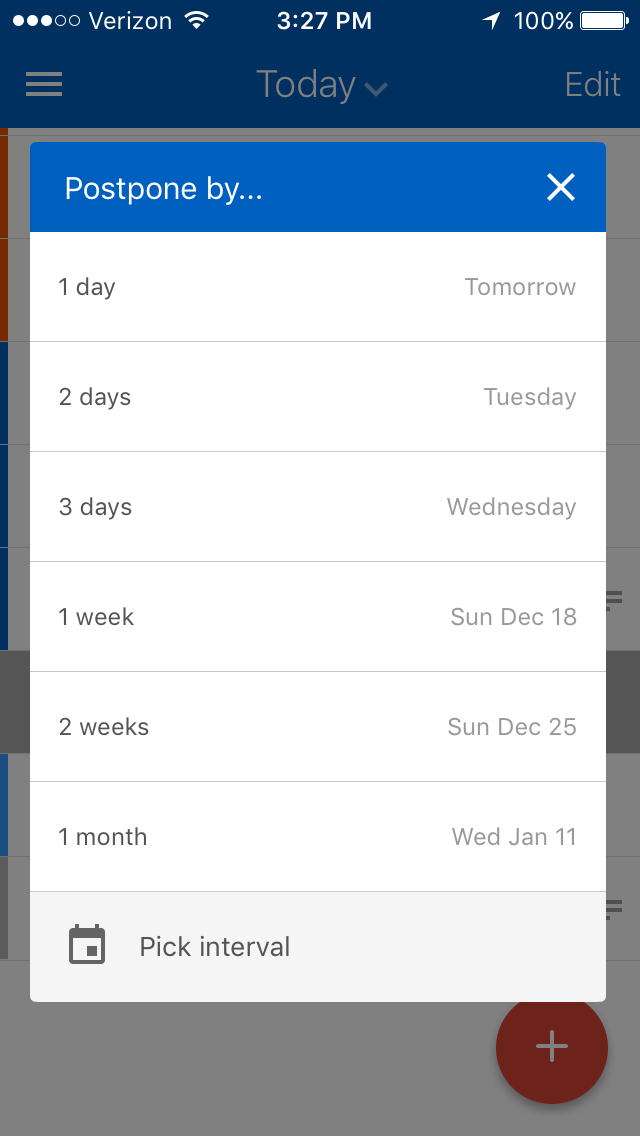
That’s 6 options right off the bat. Most apps I’ve used provide a decent variety of options for quickly changing due dates, but the ones they provide are not as useful (to me at least). RTM’s options make it easy to say:
- “This is still a high priority – make it due tomorrow”, or
- “This isn’t that important, I’ll do it in 2 or 3 days” or
- “This is something I wanted to do this weekend, but I didn’t get to it and I know I won’t do it during the week, so make it due next weekend”, or even
- “This was something that I already postponed and I still haven’t gotten to it, so put it off by a whole month”
And if you don’t want one of the predefined choices, “Pick interval” allows you to pick a date in a number of days, weeks, months, or even years, with a couple taps (instead of having to scroll through one of the date picker wheels that most apps use).
In the web and native app, there are also keyboard shortcuts that make it easy to postpone tasks (as well as adding new ones – using the punctuation I mentioned in the previous section). All these combos make it easy to keep your list(s) up-to-date and manageable and still focus on the things that need to get done.
Add To Dos From the Browser on Your Phone
This is a smaller one, and something that other apps also provide, but again, Remember The Milk it does efficiently and effectively. To get things into RTM, I used to have to email links to myself for entry later, or copy the link on a mobile phone (which in my experience can be tricky). The best part about RTM’s integration is that they have a URL field as a distinct part of the metadata so when you save a link from the web it pre-populates the task with the name of the page and the URL field. All you have to do is pick a date (or not, up to you) and a list (again, not required if you just want to save it to your default list and then move it when you get to your weekly review). The other fields like Priority and Tags are also available when saving from the browser (or not, it depends on the default fields which are configurable).
URL Field
I mentioned it above, but it bears repeating. The URL field is key. When you have a repeating task like “Check fantasy team” or “Enter this contest every day”, having a URL as a separate field keeps it from cluttering up the task description (even if it’s a clickable link from that description field).
Wide Range of Tag Colors
This is another thing that seems fairly mundane, but when you have a wide variety of tag colors to choose from, it means you can choose a different color (or one shade with a light background to distinguish it from another shade with a dark background) for different concepts and then you can just glance at your list(s) to see what kind of tasks you have to do.
I use this (though not as consistently as I should) to get an idea if I’m doing the right kinds of tasks. I have different label colors for “finances”, “fun”, “ltg” (long term goals), “writing”, “gtd” (getting things done), “tv”, “profdev” (professional development). If I look at a day and don’t see many colorful little tags next to my tasks, it’s an easily identifable sign that I’m probably working on things that aren’t that important (because they don’t fit into a project or category that I’ve already predefined). I can also see at a glance if I’ve got a good balance of writing and fun and professional development.
I’d provide a screenshot of that too, but it would take a lot of work to redact all the personal stuff that I don’t want to publish on the web, so here’s one that will give you the idea (from PCMag):

Hopefully this list has provided you with a little incentive to try out Remember The Milk for your productivity system (though if you’re like me, it probably won’t take much convincing to sign up and at least kick the tires).


![Reblog this post [with Zemanta]](https://i0.wp.com/img.zemanta.com/reblog_e.png)
 Nels Wadycki